
The head tracker built specifically for X-Plane 12 pilots on Mac
Look around.
Fly naturally.
Turn your Mac’s camera into a head tracker for X-Plane 12. Move your head naturally to look around the cockpit — no iPhone or dedicated tracking hardware required.
NOD Desktop: Mac with a camera · macOS 14 or later · X-Plane 12 with the NOD plugin (installed from the download) · free NOD account to activate · 10 free minutes, then NOD Core $9.99 once-off · NOD Pro $4.99/month adds Flight History, Replay Approach and Pilot Review, renews monthly until cancelled, and requires a separate Core purchase
Buy with the email you will sign in with, or from inside the app. Flying with your iPhone instead? NOD for iPhone · All downloads · Help
- Mac camera
- X-Plane 12
- 6DoF
- No subscription
More than just head tracking.
All of it on the iPhone you already own
-
01
6DoF head tracking
Lean in, glance across, look over your shoulder — the cockpit viewpoint follows your head in all six degrees of freedom. This is what NOD is for. Everything below exists to support it.

02
One-tap control
CENTERsets your neutral wherever you actually sit.PAUSEholds the view when you step away.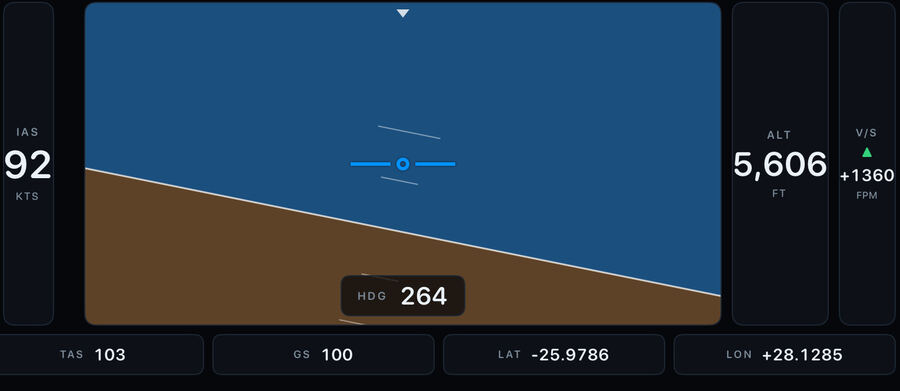
03
Live PFD
Turn the phone sideways for airspeed, altitude, attitude and vertical speed from the simulator.
04
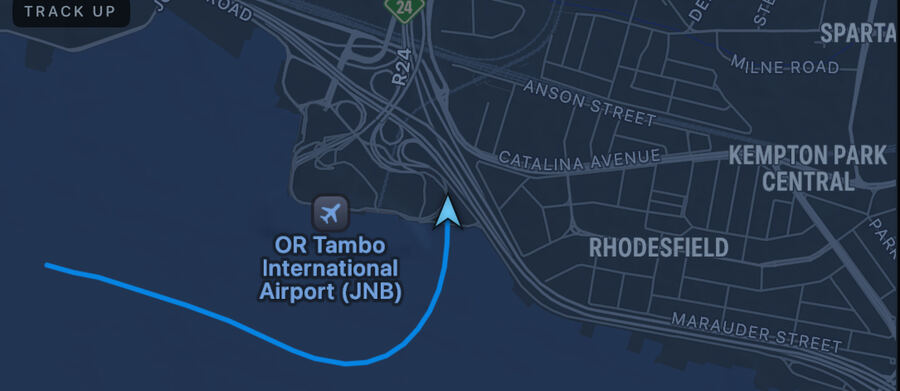
Moving map
Airports and runways read from X-Plane’s own data, with pan, zoom and a track-up view.
05
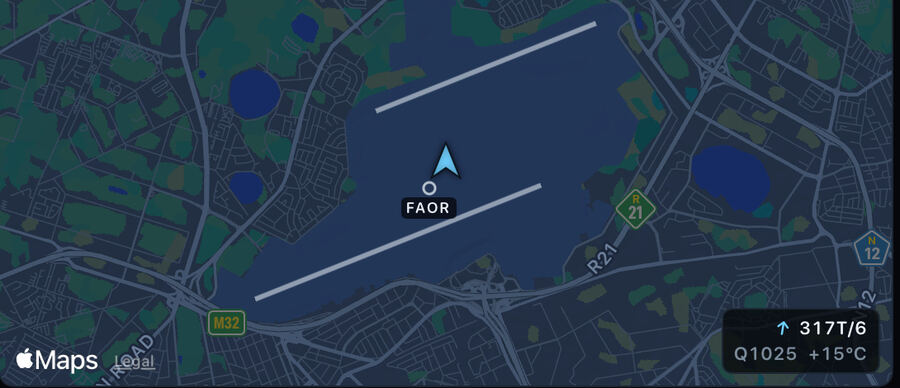
Simulator weather
Wind, pressure and temperature exactly as the simulator reports them — not a forecast.
Built for X‑Plane
Your head moves. Your view follows.
Use your iPhone to look around your X‑Plane cockpit naturally.
Look into the turn
Follow the runway through the circuit by turning your head to adjust your cockpit view.
Take a closer look
Lean towards the instruments or shift your viewpoint with six degrees of freedom.
Keep your hands on the controls
Look around the cockpit without reaching for the mouse to move your view.
Fly first.
Decide after.
NOD gives you 10 minutes of successful simulator tracking, so you can be sure it works on your own setup before you buy.
Only successful simulator tracking uses the allowance. Nothing else does.
After that, NOD Core unlocks unlimited tracking. One purchase. Yours for good. No subscription.
Flying in three steps.
iPhone and Mac on the same local network
1
Download NOD for Mac.
One file. Open
NOD for X-Plane.dmg2
Open “Install NOD” and follow the prompts.
The installer does the rest. Then start X-Plane 12.

3
Open NOD on your iPhone.
Connect →
CENTER→ fly.
The Mac companion
Download NOD for Mac
Includes Install NOD — the installer puts the X-Plane companion in place for you.
You also need NOD for iPhone — available on the App Store.
The Mac companion
Open this page on your Mac
NOD installs on the Mac running X-Plane 12. Send yourself the link and pick it up there.

nod.designbystudio.online
Already on a Mac? Download the .dmg
Not connecting?
- X-Plane 12 is running
- NOD for Mac is installed
- iPhone and Mac are on the same local network
- Local Network permission is enabled for NOD
- Still nothing? Tap
SEARCH AGAINin the app
What NOD supports today
iPhoneMacX-Plane 12Same local network
We list only what we have verified end to end on real hardware.